Urdu Typing Master Online: Free Urdu Typing Tutor and Practice
TypingSpot is a free online Urdu typing master. Use the 12 lessons above to learn Urdu typing on your normal English keyboard. Each drill shows your speed and accuracy. There is nothing to download and no sign-up.
اردو ٹائپنگ سیکھیں۔ انگریزی کی بورڈ پر, نہ ڈاؤنلوڈ، نہ سائن اپ۔
What is Urdu Typing Master, and do you still need it?
Urdu Typing Master is the name of an older Windows program. Most people searching for it just want a free way to learn Urdu typing.
The old program
- Windows desktop software
- Listed as released in 2014, updated in 2018
- Made for Windows XP to 8
- About 11.68 MB to download
- We have not tested it
TypingSpot
- Runs in any modern browser
- Built for current browsers
- 12 lessons and 40 drills
- Nothing to install
- Free, no sign-up
Old-program details come from a download site's public listing. TypingSpot is a separate Urdu typing tutor and is not connected to that program.
Careful with downloads. Old typing programs sit on third-party sites. Scan anything you download, and use a source you trust.
How do the Urdu typing lessons work?
- Pick a lesson. Start with Lesson 1, or take the Urdu typing test to find your level.
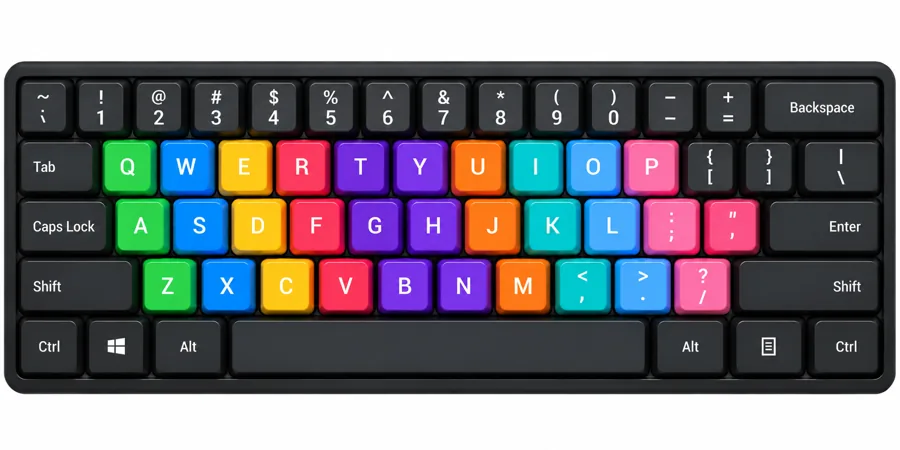
- Type the drill. The on-screen keyboard shows the next key. Hand guides show which finger to use.
- Get your stars. Your score is 70% accuracy and 30% speed. Reach 20 to pass, and up to 5 stars as it grows.
- Press Enter. If you passed, Enter opens the next lesson. If not, it restarts the drill.
Stars and progress are saved in this browser only. There are no accounts. For finger placement and a 4-week plan, read the course guide.
What are the 12 Urdu typing lessons?
Lessons 1 to 6 each have All Keys, Mixed Keys and Words drills, plus a test. The rest have a drill and a test.
How do beginners practice Urdu typing?
Start slow and look at the screen, not the keys. Accuracy comes first. Fast typing with many mistakes builds bad habits.
- Do one lesson a day, about 15 minutes.
- Use the right finger for each key.
- Repeat a drill until you earn at least 3 stars.
- Hide the on-screen keyboard once you know the keys.
- Sit straight, relax your wrists and rest every 30 minutes.
What is the best way to do Urdu typing practice?
Short daily sessions beat one long one a week. Here is a simple 15-minute routine.
- 3 minWarm up with a drill you have already passed.
- 8 minWork on your current lesson. Repeat any drill that scores low.
- 4 minType a sentence or paragraph from Lessons 8 and 9.
Each drill has a timer of 1, 2, 5 or 10 minutes, or none. Short timers suit daily rounds. Longer ones build stamina.
کوشش کریں کہ غلطی نہ ہو، تیز ٹائپنگ کی کوشش نہ کریں، رفتار آہستہ آہستہ خود بن جاتی ہے۔
Once a week, take the Urdu typing test on new text to see real progress.
Which Urdu keyboard layout should I learn?
There is no single standard. Learn the one you will actually use.
| Layout | How it works | Good for |
|---|---|---|
| Phonetic | Keys match the letter's sound, so B types ب | Beginners who know the English keyboard |
| Windows Urdu | Letters sit in fixed spots set by the system | Typing in Windows programs |
| InPage | Its own layout inside InPage software | Publishing and older design work |
TypingSpot teaches a phonetic layout. A few keys may differ from other phonetic keyboards, so use the key map in each lesson.
Job test? Practice on the layout the notice names. You can try keys on the online Urdu keyboard.
How does TypingSpot compare with other Urdu typing software?
| Option | What it is | Cost |
|---|---|---|
| TypingSpot | Browser lessons and drills, no install | Free |
| Windows Urdu keyboard | Built-in input method, not a tutor | Included |
| Phonetic keyboard installs | Add-on layouts, such as the CRULP one | Free |
| InPage | Urdu publishing software | Paid |
| Ustaad Typing Academy | Windows app with Urdu phonetic courses (Microsoft Store) | 7-day trial, then paid |
| Phone keyboards | Built into Android and iPhone | Free |
Based on each product's public page. We have not tested the others, and details can change.
How do I type zabar, zer and pesh?
Type the letter first, then the mark. These are the keys in our layout. Bonus 3 lets you practice them, and the online Urdu keyboard shows more marks.
What are the common Urdu typing problems?
Letters do not join
Usually a font problem. Switch to an Urdu font such as Noto Naskh Arabic.
Two kinds of ye
Use the small ye in the middle of a word. The big ye ends some words.
Digits look different
The shapes of 4, 6 and 7 change with the font. This is normal.
Phone with a keyboard
Android may not switch to Urdu with an external keyboard. A computer is more reliable.
What is a good Urdu typing speed?
Your drill score is out of 100. Accuracy counts for 70% and speed for 30%, and 30 WPM counts as full speed. The stars are our own scale, not an official benchmark.
Example: 95% accuracy at 15 WPM scores about 82, which is 4 stars.
For sourced speed benchmarks, see the Urdu typing test page.
Is TypingSpot good for job typing tests?
It builds speed and accuracy, but it is not an official exam. Check these in the job notice:
- Which keyboard layout the test uses
- The speed and accuracy targets
- How mistakes are counted
The course guide has more.
How was this page made?
- Made by
- The TypingSpot team, who built the lessons and drills.
- What we tested
- The lessons, scoring and keys on this site. We did not test the other programs named here.
- Privacy
- No account. Progress stays in your browser.
- Limits
- Best on a computer keyboard. No certificate.
- Found a mistake?
- Email typingspotweb@gmail.com and we will fix it.
Sources used on this page
- Get Into PC listing for Urdu Typing Master
- CLE page for the CRULP Urdu phonetic keyboard
- SourceForge: Urdu Typing Tutor project
More typing practice
Frequently asked questions about Urdu typing master and practice
What is an Urdu typing tutor?
An Urdu typing tutor is a program that teaches you to type Urdu with lessons, drills and feedback on speed and accuracy. TypingSpot is a free one that runs in your browser.
Is there an online Urdu Typing Master, and is it free?
Yes. TypingSpot is a free online Urdu typing tutor. It has 12 lessons and practice drills, and it needs no download and no sign-up. The old Urdu Typing Master was a separate Windows program, and this site is not that program.
How do I type Urdu on my laptop using an English keyboard?
Open any lesson on this page. Each English key types one Urdu letter, so A types ا and B types ب. You do not need to install anything. For other programs, add an Urdu keyboard in your system's language or keyboard settings.
Do I need to install an Urdu keyboard?
Not to practice here. The lessons work on your normal English keyboard. You only need an installed Urdu keyboard when you want to type Urdu in other programs, such as Word or a browser form.
How do I activate the Urdu keyboard?
Open your computer's language or keyboard settings and add Urdu as an input language. The exact steps depend on your system and its version, so check its help page. You do not need this to practice on TypingSpot.
Is there a standard Urdu keyboard layout?
Not one that everyone uses. Phonetic, Windows and InPage layouts all exist, and they place some letters in different spots. Moving between them takes some relearning.
Which Urdu keyboard layout should I learn?
Learn the one you will actually use. A job test, school or office may name a layout, so read the notice first. If nothing is named, a phonetic layout is the easiest to start with, and that is what these lessons teach.
How do I learn Urdu typing from scratch?
Start at Lesson 1 and go in order. Practice for about 15 minutes a day, aim for accuracy first, and repeat any drill that scores low. Speed comes after the keys feel familiar.
How do I type zabar, zer and pesh?
Type the letter first, then the mark. In our layout zer is Shift + comma, zabar is Shift + full stop and pesh is Shift + P. Bonus 3: Diacritics teaches all of them.
Why do Urdu letters not join on my computer?
Usually the font is the cause. Some fonts show Urdu letters separately. Switch to an Urdu font such as Noto Naskh Arabic and the letters should join. If they still do not, the program may not support Urdu script well.
Can I practice Urdu typing on my phone?
The lessons are built for a computer keyboard, so use a computer for scored practice. On a phone you can add an Urdu keyboard in your phone's settings and type messages, but it is not the same skill.
How can I practice Urdu typing every day?
Pick one lesson, do it with the timer on, and repeat it until you earn at least 3 stars. Then move on. Take the Urdu typing test once a week to see real progress.
Does TypingSpot save my progress?
Yes, in your browser only. There are no accounts, so clearing your browser data or changing device resets it.
Is this good for government job typing tests?
It helps you build speed and accuracy, but it is not an official exam. Targets and layouts change from post to post, so check the job notice.